
ScrapeGraph
STDIOScapeGraph API智能网页抓取集成服务
ScapeGraph API智能网页抓取集成服务


A production-ready Model Context Protocol (MCP) server that provides seamless integration with the ScrapeGraph AI API. This server enables language models to leverage advanced AI-powered web scraping capabilities with enterprise-grade reliability.
.agent/ folderSign up and get your API key from the ScrapeGraph Dashboard
npx -y @smithery/cli install @ScrapeGraphAI/scrapegraph-mcp --client claude
Ask Claude or Cursor:
That's it! The server is now available to your AI assistant.
The server provides 8 enterprise-ready tools for AI-powered web scraping:
markdownifyTransform any webpage into clean, structured markdown format.
markdownify(website_url: str)
smartscraperLeverage AI to extract structured data from any webpage with support for infinite scrolling.
smartscraper(
    user_prompt: str,
    website_url: str,
    number_of_scrolls: int = None,
    markdown_only: bool = None
)
searchscraperExecute AI-powered web searches with structured, actionable results.
searchscraper(
    user_prompt: str,
    num_results: int = None,
    number_of_scrolls: int = None
)
scrapeBasic scraping endpoint to fetch page content with optional heavy JavaScript rendering.
scrape(website_url: str, render_heavy_js: bool = None)
sitemapExtract sitemap URLs and structure for any website.
sitemap(website_url: str)
smartcrawler_initiateInitiate intelligent multi-page web crawling (asynchronous operation).
smartcrawler_initiate(
    url: str,
    prompt: str = None,
    extraction_mode: str = "ai",
    depth: int = None,
    max_pages: int = None,
    same_domain_only: bool = None
)
request_id for pollingsmartcrawler_fetch_resultsRetrieve results from asynchronous crawling operations.
smartcrawler_fetch_results(request_id: str)
agentic_scrapperRun advanced agentic scraping workflows with customizable steps and structured output schemas.
agentic_scrapper(
    url: str,
    user_prompt: str = None,
    output_schema: dict = None,
    steps: list = None,
    ai_extraction: bool = None,
    persistent_session: bool = None,
    timeout_seconds: float = None
)
To utilize this server, you'll need a ScrapeGraph API key. Follow these steps to obtain one:
For automated installation of the ScrapeGraph API Integration Server using Smithery:
npx -y @smithery/cli install @ScrapeGraphAI/scrapegraph-mcp --client claude
Update your Claude Desktop configuration file with the following settings (located on the top rigth of the Cursor page):
(remember to add your API key inside the config)
{
    "mcpServers": {
        "@ScrapeGraphAI-scrapegraph-mcp": {
            "command": "npx",
            "args": [
                "-y",
                "@smithery/cli@latest",
                "run",
                "@ScrapeGraphAI/scrapegraph-mcp",
                "--config",
                "\"{\\\"scrapegraphApiKey\\\":\\\"YOUR-SGAI-API-KEY\\\"}\""
            ]
        }
    }
}
The configuration file is located at:
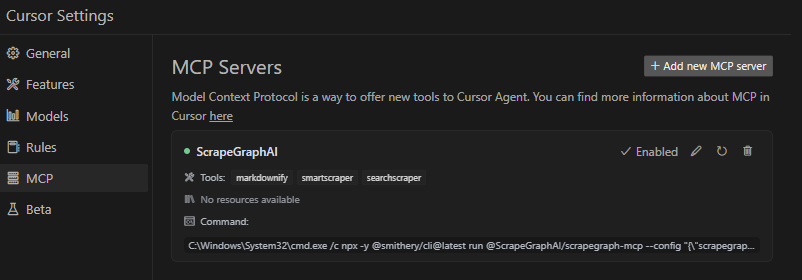
%APPDATA%/Claude/claude_desktop_config.json~/Library/Application\ Support/Claude/claude_desktop_config.jsonAdd the ScrapeGraphAI MCP server on the settings:
To run the MCP server locally for development or testing, follow these steps:
git clone https://github.com/ScrapeGraphAI/scrapegraph-mcp
cd scrapegraph-mcp
# Using pip
pip install -e .

# Or using uv (faster)
uv pip install -e .
# macOS/Linux
export SGAI_API_KEY=your-api-key-here

# Windows (PowerShell)
$env:SGAI_API_KEY="your-api-key-here"

# Windows (CMD)
set SGAI_API_KEY=your-api-key-here
You can run the server directly:
# Using the installed command
scrapegraph-mcp

# Or using Python module
python -m scrapegraph_mcp.server
The server will start and communicate via stdio (standard input/output), which is the standard MCP transport method.
Test your local server using the MCP Inspector tool:
npx @modelcontextprotocol/inspector python -m scrapegraph_mcp.server
This provides a web interface to test all available tools interactively.
To use your locally running server with Claude Desktop, update your configuration file:
macOS/Linux (~/Library/Application Support/Claude/claude_desktop_config.json):
{
    "mcpServers": {
        "scrapegraph-mcp-local": {
            "command": "python",
            "args": [
                "-m",
                "scrapegraph_mcp.server"
            ],
            "env": {
                "SGAI_API_KEY": "your-api-key-here"
            }
        }
    }
}
Windows (%APPDATA%\Claude\claude_desktop_config.json):
{
    "mcpServers": {
        "scrapegraph-mcp-local": {
            "command": "python",
            "args": [
                "-m",
                "scrapegraph_mcp.server"
            ],
            "env": {
                "SGAI_API_KEY": "your-api-key-here"
            }
        }
    }
}
Note: Make sure Python is in your PATH. You can verify by running python --version in your terminal.
In Cursor's MCP settings, add a new server with:
python["-m", "scrapegraph_mcp.server"]{"SGAI_API_KEY": "your-api-key-here"}Server not starting:
python --versionpip list | grep scrapegraph-mcpecho $SGAI_API_KEY (macOS/Linux) or echo %SGAI_API_KEY% (Windows)Tools not appearing:
~/Library/Logs/Claude/%APPDATA%\Claude\Logs\Import errors:
pip install -e . --force-reinstallpip install -r requirements.txt (if available)The ScrapeGraph MCP server can be integrated with Google ADK (Agent Development Kit) to create AI agents with web scraping capabilities.
pip install google-adk
export SGAI_API_KEY=your-api-key-here
Create an agent file (e.g., agent.py) with the following configuration:
import os
from google.adk.agents import LlmAgent
from google.adk.tools.mcp_tool.mcp_toolset import MCPToolset
from google.adk.tools.mcp_tool.mcp_session_manager import StdioConnectionParams
from mcp import StdioServerParameters

# Path to the scrapegraph-mcp server directory
SCRAPEGRAPH_MCP_PATH = "/path/to/scrapegraph-mcp"

# Path to the server.py file
SERVER_SCRIPT_PATH = os.path.join(
    SCRAPEGRAPH_MCP_PATH,
    "src",
    "scrapegraph_mcp",
    "server.py"
)

root_agent = LlmAgent(
    model='gemini-2.0-flash',
    name='scrapegraph_assistant_agent',
    instruction='Help the user with web scraping and data extraction using ScrapeGraph AI. '
                'You can convert webpages to markdown, extract structured data using AI, '
                'perform web searches, crawl multiple pages, and automate complex scraping workflows.',
    tools=[
        MCPToolset(
            connection_params=StdioConnectionParams(
                server_params=StdioServerParameters(
                    command='python3',
                    args=[
                        SERVER_SCRIPT_PATH,
                    ],
                    env={
                        'SGAI_API_KEY': os.getenv('SGAI_API_KEY'),
                    },
                ),
                timeout=300.0,)
            ),
            # Optional: Filter which tools from the MCP server are exposed
            # tool_filter=['markdownify', 'smartscraper', 'searchscraper']
        )
    ],
)
Timeout Settings:
Tool Filtering:
tool_filter to limit which tools are available:
tool_filter=['markdownify', 'smartscraper', 'searchscraper']
API Key Configuration:
export SGAI_API_KEY=your-keyenv dict: 'SGAI_API_KEY': 'your-key-here'Once configured, your agent can use natural language to interact with web scraping tools:
# The agent can now handle queries like:
# - "Convert https://example.com to markdown"
# - "Extract all product prices from this e-commerce page"
# - "Search for recent AI research papers and summarize them"
# - "Crawl this documentation site and extract all API endpoints"
For more information about Google ADK, visit the official documentation.
The server enables sophisticated queries across various scraping scenarios:
The server implements robust error handling with detailed, actionable error messages for:
When running on Windows systems, you may need to use the following command to connect to the MCP server:
C:\Windows\System32\cmd.exe /c npx -y @smithery/cli@latest run @ScrapeGraphAI/scrapegraph-mcp --config "{\"scrapegraphApiKey\":\"YOUR-SGAI-API-KEY\"}"
This ensures proper execution in the Windows environment.
"ScrapeGraph client not initialized"
SGAI_API_KEY environment variable or provide via --config"Error 401: Unauthorized"
"Error 402: Payment Required"
SmartCrawler not returning results
smartcrawler_fetch_results() until status is "completed"Tools not appearing in Claude Desktop
~/Library/Logs/Claude/ (macOS) or %APPDATA%\Claude\Logs\ (Windows)For detailed troubleshooting, see the .agent documentation.
# Clone the repository
git clone https://github.com/ScrapeGraphAI/scrapegraph-mcp
cd scrapegraph-mcp

# Install dependencies
pip install -e ".[dev]"

# Set your API key
export SGAI_API_KEY=your-api-key

# Run the server
scrapegraph-mcp
# or
python -m scrapegraph_mcp.server
Test your server locally using the MCP Inspector tool:
npx @modelcontextprotocol/inspector scrapegraph-mcp
This provides a web interface to test all available tools.
Linting:
ruff check src/
Type Checking:
mypy src/
Format Checking:
ruff format --check src/
scrapegraph-mcp/
├── src/
│   └── scrapegraph_mcp/
│       ├── __init__.py      # Package initialization
│       └── server.py        # Main MCP server (all code in one file)
├── .agent/                  # Developer documentation
│   ├── README.md           # Documentation index
│   └── system/             # System architecture docs
├── assets/                  # Images and badges
├── pyproject.toml          # Project metadata & dependencies
├── smithery.yaml           # Smithery deployment config
└── README.md               # This file
We welcome contributions! Here's how you can help:
ScapeGraphClient class in server.py:def new_tool(self, param: str) -> Dict[str, Any]: """Tool description.""" url = f"{self.BASE_URL}/new-endpoint" data = {"param": param} response = self.client.post(url, headers=self.headers, json=data) if response.status_code != 200: raise Exception(f"Error {response.status_code}: {response.text}") return response.json()
@mcp.tool()
def new_tool(param: str) -> Dict[str, Any]:
    """
    Tool description for AI assistants.

    Args:
        param: Parameter description

    Returns:
        Dictionary containing results
    """
    if scrapegraph_client is None:
        return {"error": "ScrapeGraph client not initialized. Please provide an API key."}

    try:
        return scrapegraph_client.new_tool(param)
    except Exception as e:
        return {"error": str(e)}
npx @modelcontextprotocol/inspector scrapegraph-mcp
Update documentation:
Submit a pull request
git checkout -b feature/amazing-feature)git commit -m 'Add amazing feature')git push origin feature/amazing-feature)For detailed development guidelines, see the .agent documentation.
For comprehensive developer documentation, see:
https://api.scrapegraphai.com/v1This project is distributed under the MIT License. For detailed terms and conditions, please refer to the LICENSE file.
Special thanks to tomekkorbak for his implementation of oura-mcp-server, which served as starting point for this repo.
Made with ❤️ by ScrapeGraphAI Team