
Pomerium聊天
HTTP-SSE展示Pomerium安全认证的MCP服务器聊天应用
展示Pomerium安全认证的MCP服务器聊天应用
Welcome to the Pomerium Chat, a minimal chat application for showcasing remote Model Context Protocol servers secured with Pomerium.


https://github.com/user-attachments/assets/50a17106-a471-4f64-be81-982c09d4689e
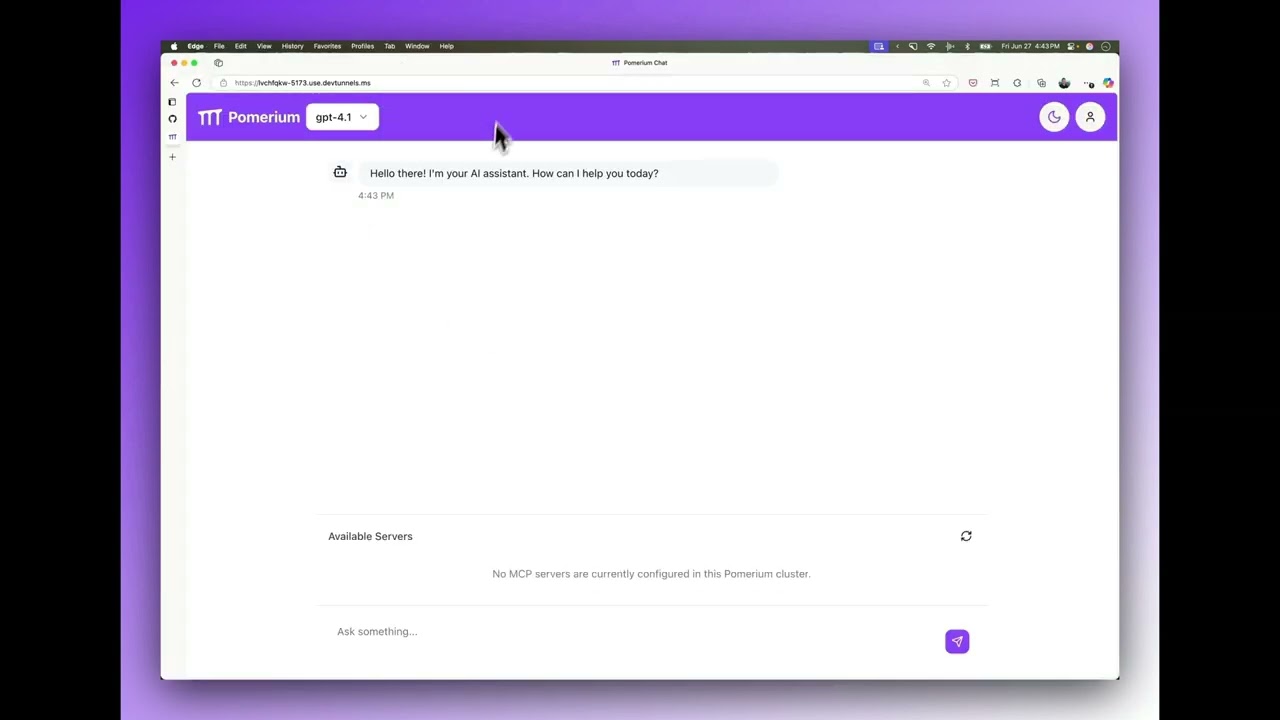
Create a .env-mcp-app-demo file in the root directory and add the following environment variables:
OPENAI_API_KEY=your_api_key_here
Update pomerium-config.yaml and replace YOUR-DOMAIN with the subdomain you control. Create A DNS records for relevant hosts (or *.YOUR-DOMAIN).
By default, the access policy limits access to users with emails in YOUR-DOMAIN. See policy language reference if you need to adjust it.
See docker-compose.yaml file in this repo.
docker compose up -d
It includes a demo SQLite server that requires a demo database, for example https://github.com/jpwhite3/northwind-SQLite3 that needs be saved as sqlite.db.
Now you should be able to navigate to https://mcp-app-demo.YOUR-DOMAIN/.
A sign-in page would open. After you signed in, you should be redirected to the application itself.
There should be a demo database server (Database) acessible and in Connected status. Click on it to use it in the conversation.
Now you may ask some questions like "What were our sales by year", and see how OpenAI large language model inference would interact with the MCP database server running on your computer to obtain the answers.
See Model Context Protocol Capability Overview for more details.
External Token (TE): An externally-facing token issued by Pomerium that represents the user's session. This token is used by external clients (such as Claude.ai, OpenAI, or your own apps) to authenticate requests to Pomerium-protected MCP servers. Example: The token you provide to an LLM API or agentic framework to allow it to call your MCP server.
Internal Token (TI): An internal authentication token that Pomerium obtains from an upstream OAuth2 provider (such as Notion, Google Drive, GitHub, etc.) on behalf of the user. This token is never exposed to external clients. Pomerium uses this token to authenticate requests to the upstream service when proxying requests to your MCP server.
Pomerium acts as a secure gateway between Model Context Protocol (MCP) clients and servers. It provides authentication and authorization for local HTTP MCP servers, using OAuth 2.1 flows. This setup is especially useful when your MCP server needs to access upstream APIs that require OAuth tokens (such as Notion, Google Drive, GitHub, etc.).
It also enables you to build internal applications that use agentic frameworks or LLM APIs capable of invoking MCP servers, as demonstrated in this repository.
To understand this setup, let's look at how an MCP client communicates with MCP servers that are protected by Pomerium.
https://github.com/user-attachments/assets/c7a809ad-6f0a-4ea3-94a2-6cf22ea6d27b
Suppose you want to allow an external MCP client (like Claude.ai) to access your internal MCP server, but you want to keep it secure. Pomerium sits in front of your server and manages authentication and authorization for all incoming requests.
This means you can safely share access to internal resources (like a database) with external clients, without exposing them directly to the internet.
You configure your Pomerium Route as usual with an additional mcp property that signifies that this route represents a Model Context Protocol server route.
routes:
  - from: https://my-mcp-server.your-domain.com
    to: http://my-mcp-server.int:8080/mcp
    name: My MCP Server
    mcp:
      server: {}
sequenceDiagram
  actor U as User
  participant C as MCP Client
  participant P as Pomerium
  participant S as MCP Server
  U ->> C: Adds a server URL
  C ->> P: Registers client, initiates auth
  P ->> C: Sign-in URL
  C ->> U: Redirect to sign-in URL
  U ->> P: Sign-in
  P ->> C: Redirect to client
  C ->> P: Obtain Token
  C ->> P: GET https://mcp-server Authorization: Bearer Token
  P ->> S: Proxy request to MCP Server
If your MCP server needs to access an upstream service that requires OAuth (for example, GitHub or Google Drive), Pomerium can handle the OAuth flow for you. Here’s how the process works:
Authorization header.Key benefits:
Route configuration:
routes:
  - from: https://github.your-domain
    to: http://github-mcp.int:8080/mcp
    name: GitHub
    mcp:
      server:
        upstream_oauth2:
          client_id: xxxxxxxxxxxx
          client_secret: yyyyyyyyy
          scopes: ['read:user', 'user:email']
          endpoint:
            auth_url: 'https://github.com/login/oauth/authorize'
            token_url: 'https://github.com/login/oauth/access_token'
sequenceDiagram
  actor U as User
  participant C as MCP Client
  participant O as Upstream OAuth
  participant P as Pomerium
  participant S as MCP Server
  U ->> C: Adds a server URL
  C ->> P: Registers client, initiates auth
  P ->> C: Sign-in URL
  C ->> U: Redirect to sign-in URL
  U ->> P: Sign-in
  P ->> U: Redirect to upstream OAuth
  U ->> O: Authenticate with upstream OAuth
  O ->> P: Return Internal Token (TI)
  P ->> C: Redirect to client
  C ->> P: Obtain External Token (TE)
  C ->> P: GET https://mcp-server Authorization: Bearer (TE)
  P ->> O: Refresh (TI) if necessary
  P ->> S: Proxy request to MCP Server, Bearer (TI)
Some inference APIs, such as the OpenAI API and Claude API, now support direct invocation of MCP servers. This trend is expected to grow, and many agentic frameworks are adding support for MCP server calls. You can also implement MCP tool calls manually in your app using LLM function calling capabilities. All these approaches require providing an Authorization: Bearer External Token (TE) for the MCP server so that requests can be securely routed through Pomerium.
If you are building your own internal application and need to obtain such a token, Pomerium offers a client MCP mode for routes. By setting the mcp.pass_upstream_access_token option, Pomerium will supply your upstream application with an Authorization: Bearer External Token (TE) representing the current user session. You can then pass this token to external LLMs or agentic frameworks, allowing them to access MCP servers behind Pomerium according to your authorization policy.
The following flow illustrates this process, assuming the user is already authenticated with Pomerium:
sequenceDiagram
  actor U as User
  participant P as Pomerium
  participant C as Your App Backend
  participant S as MCP Server
  participant I as LLM API
  U ->> P: GET https://mcp-app-demo.your-domain.com
  P ->> C: GET http://mcp-app-demo:3000 Authorization: Bearer (TE)
  C ->> I: call tool https://mcp-server.your-domain Authorization: Bearer (TE)
  I ->> P: GET https://mcp-server.your-domain Authorization: Bearer (TE)
  P ->> S: GET https://mcp-server
Example route configuration:
routes:
  - from: https://mcp-app-demo.your-domain.com
    to: http://mcp-app-demo:3000
    mcp:
      client: {}
    policy:
      domain:
        is: your-domain.com
  - from: https://mcp-server.your-domain.com
    to: http://mcp-server.int:8080/mcp
    name: My MCP Server
    mcp:
      server: {}
    policy:
      domain:
        is: your-domain.com
You can provide users with a dynamic list of MCP servers protected by the same Pomerium instance as your application. To do this, issue an HTTP request to your app backend using the same Authorization: Bearer token your backend received. The response will include the list and connection status of each MCP server upstream available to this Pomerium cluster.
The connected property indicates whether the current user has all required internal tokens for upstream OAuth (if needed):
A later section will explain how to ensure your user has all required internal tokens.
GET https://mcp-demo-app.yourdomain.com/.pomerium/mcp/routes HTTP/1.1
Accept: application/json
Authorization: Bearer (TE)

Content-Type: application/json
{
    "servers": [
        {
            "name": "DB",
            "url": "https://db-mcp.your-domain.com",
            "connected": true
        },
        {
            "name": "GitHub",
            "url": "https://github-mcp.your-domain.com",
            "connected": false
        }
    ]
}
If your target MCP server shows connected: false, the user needs to authenticate with the required upstream OAuth2 provider.
To do this, redirect the user's browser to the special /.pomerium/mcp/connect path on the MCP server route (for example: https://db-mcp.your-domain.com/.pomerium/mcp/connect).
Include a redirect_url query parameter that points back to your application's page—this is where the user should return after authentication, and where you can reload the MCP server list and their connection status.
Note: For security, the redirect_url must be a host that matches one of your MCP Client routes.
After the user completes authentication, the MCP server's connected status should become true.
To access the authenticated user's identity and claims, both your MCP client application and MCP server should read the X-Pomerium-Assertion HTTP header.
This header contains a signed JWT with user information, which you can decode and verify to obtain details such as the user's email, name, and other claims.
Pomerium provides comprehensive audit logging for all MCP tool calls, allowing you to monitor and analyze how external clients interact with your MCP servers.
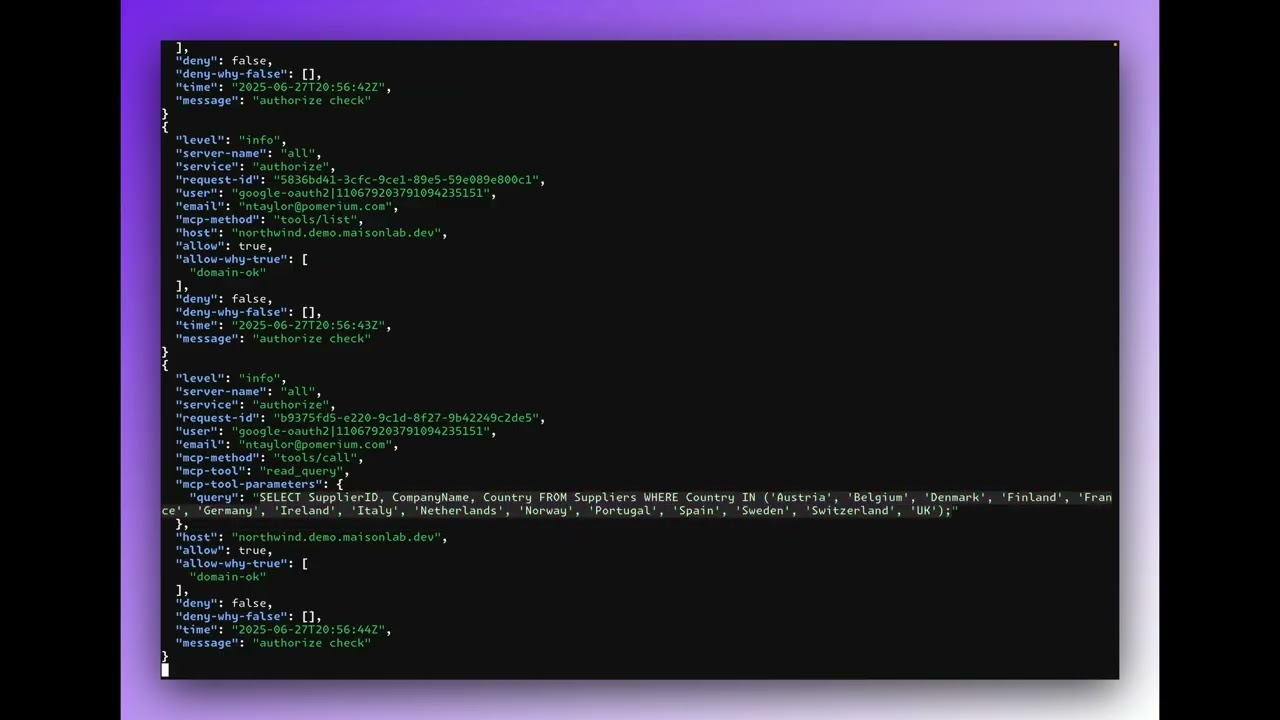
You can monitor MCP tool calls in real-time using the following commands:
View unfiltered audit logs as they occur:
docker compose logs -f pomerium \
  | grep --line-buffered "authorize" \
  | grep --line-buffered "mcp-"
View formatted audit logs with syntax highlighting:
docker compose logs -f pomerium \
  | grep --line-buffered "authorize" \
  | grep --line-buffered "mcp-" \
  | sed -u 's/^[^{]*//' \
  | jq -C
Note: You'll need to have jq installed for JSON formatting.
Here's an example of what an MCP tool call audit log entry looks like:
{
  "level": "info",
  "server-name": "all",
  "service": "authorize",
  "request-id": "b9375fd5-e220-9c1d-8f27-9b42249c2de5",
  "user": "google-oauth2|110679203791094235151",
  "email": "[email protected]",
  "mcp-method": "tools/call",
  "mcp-tool": "read_query",
  "mcp-tool-parameters": {
    "query": "SELECT SupplierID, CompanyName, Country FROM Suppliers WHERE Country IN ('Austria', 'Belgium', 'Denmark', 'Finland', 'France', 'Germany', 'Ireland', 'Italy', 'Netherlands', 'Norway', 'Portugal', 'Spain', 'Sweden', 'Switzerland', 'UK');"
  },
  "host": "northwind.mcp.pomerium.com",
  "allow": true,
  "allow-why-true": ["domain-ok"],
  "deny": false,
  "deny-why-false": [],
  "time": "2025-06-27T20:56:44Z",
  "message": "authorize check"
}
To enable comprehensive MCP audit logging, add the following global section to your Pomerium configuration. Note that mcp-* fields are new authorize_log_fields specifically designed to support MCPs:
# for MCP observability
authorize_log_fields:
  - request-id
  - user
  - email
  - mcp-method
  - mcp-tool
  - mcp-tool-parameters
  - host
This configuration ensures that all MCP-specific information is included in your audit logs, providing complete visibility into tool calls and their parameters.
To run this application in development mode:
npm install
npm run dev
This will start the development server with hot reloading enabled.
To build and run this application for production:
npm run build
npm run start
This project uses Vitest for testing. You can run the tests with:
npm run test
This project uses Tailwind CSS for styling and shadcn/ui for pre-built components. The UI components are built on top of Radix UI primitives.
Add new shadcn components using:
npx shadcn@latest add [component-name]
This project uses eslint and prettier for linting and formatting. Eslint is configured using tanstack/eslint-config. The following scripts are available:
npm run lint
npm run format
npm run check
Add components using the latest version of Shadcn.
pnpx shadcn@latest add button
This project uses TanStack Router. The initial setup is a file based router. Which means that the routes are managed as files in src/routes.