
Outline文档
STDIOAI助手与Outline文档服务交互的MCP服务器
AI助手与Outline文档服务交互的MCP服务器


A Model Context Protocol server for interacting with Outline document management.
Before using this MCP server, you need:
Getting your API key: Log into Outline → Click your profile → Settings → API Keys → "New API Key". Copy the generated token.
uvx mcp-outline
pip install mcp-outline
docker run -e OUTLINE_API_KEY=<your-key> ghcr.io/vortiago/mcp-outline:latest
Or build from source:
docker buildx build -t mcp-outline .
docker run -e OUTLINE_API_KEY=<your-key> mcp-outline
| Variable | Required | Default | Notes |
|---|---|---|---|
OUTLINE_API_KEY | Yes | - | Get from Outline web UI: Settings → API Keys → Create New |
OUTLINE_API_URL | No | https://app.getoutline.com/api | For self-hosted: https://your-domain/api |
OUTLINE_READ_ONLY | No | false | true = disable ALL write operations (details) |
OUTLINE_DISABLE_DELETE | No | false | true = disable only delete operations (details) |
OUTLINE_DISABLE_AI_TOOLS | No | false | true = disable AI tools (for Outline instances without OpenAI) |
MCP_TRANSPORT | No | stdio | Transport mode: stdio (local), sse or streamable-http (remote) |
MCP_HOST | No | 127.0.0.1 | Server host. Use 0.0.0.0 in Docker for external connections |
MCP_PORT | No | 3000 | HTTP server port (only for sse and streamable-http modes) |
Configure server permissions to control what operations are allowed:
Set OUTLINE_READ_ONLY=true to enable viewer-only access. Only search, read, export, and collaboration viewing tools are available. All write operations (create, update, move, archive, delete) are disabled.
Use cases:
Available tools:
search_documents, list_collections, get_collection_structure, get_document_id_from_titleread_document, export_documentlist_document_comments, get_commentget_document_backlinksexport_collection, export_all_collectionsask_ai_about_documents (if not disabled with OUTLINE_DISABLE_AI_TOOLS)Set OUTLINE_DISABLE_DELETE=true to allow create and update workflows while preventing accidental data loss. Only delete operations are disabled.
Use cases:
Disabled tools:
delete_document, delete_collectionbatch_delete_documentsImportant: OUTLINE_READ_ONLY=true takes precedence over OUTLINE_DISABLE_DELETE. If both are set, the server operates in read-only mode.
Prerequisites: Install
uvwithpip install uvor from astral.sh/uv
Edit ~/Library/Application Support/Claude/claude_desktop_config.json (or %APPDATA%\Claude\claude_desktop_config.json on Windows):
{
  "mcpServers": {
    "mcp-outline": {
      "command": "uvx",
      "args": ["mcp-outline"],
      "env": {
        "OUTLINE_API_KEY": "<YOUR_API_KEY>",
        "OUTLINE_API_URL": "<YOUR_OUTLINE_URL>" // Optional
      }
    }
  }
}
Go to Settings → MCP and click Add Server:
{
  "mcp-outline": {
    "command": "uvx",
    "args": ["mcp-outline"],
    "env": {
      "OUTLINE_API_KEY": "<YOUR_API_KEY>",
      "OUTLINE_API_URL": "<YOUR_OUTLINE_URL>" // Optional
    }
  }
}
Create a .vscode/mcp.json file in your workspace with the following configuration:
{
  "servers": {
    "mcp-outline": {
      "type": "stdio",
      "command": "uvx",
      "args": ["mcp-outline"],
      "env": {
        "OUTLINE_API_KEY": "<YOUR_API_KEY>"
      }
    }
  }
}
For self-hosted Outline instances, add OUTLINE_API_URL to the env object.
Optional: Use input variables for sensitive credentials:
{
  "inputs": [
    {
      "type": "promptString",
      "id": "outline-api-key",
      "description": "Outline API Key",
      "password": true
    }
  ],
  "servers": {
    "mcp-outline": {
      "type": "stdio",
      "command": "uvx",
      "args": ["mcp-outline"],
      "env": {
        "OUTLINE_API_KEY": "${input:outline-api-key}"
      }
    }
  }
}
VS Code will automatically discover and load MCP servers from this configuration file. For more details, see the official VS Code MCP documentation.
In Cline extension settings, add to MCP servers:
{
  "mcp-outline": {
    "command": "uvx",
    "args": ["mcp-outline"],
    "env": {
      "OUTLINE_API_KEY": "<YOUR_API_KEY>",
      "OUTLINE_API_URL": "<YOUR_OUTLINE_URL>" // Optional
    }
  }
}
If you prefer to use pip instead:
pip install mcp-outline
Then in your client config, replace "command": "uvx" with "command": "mcp-outline" and remove the "args" line:
{
  "mcp-outline": {
    "command": "mcp-outline",
    "env": {
      "OUTLINE_API_KEY": "<YOUR_API_KEY>",
      "OUTLINE_API_URL": "<YOUR_OUTLINE_URL>" // Optional
    }
  }
}
For remote access or Docker containers, use HTTP transport. This runs the MCP server on port 3000:
docker run -p 3000:3000 \
  -e OUTLINE_API_KEY=<YOUR_API_KEY> \
  -e MCP_TRANSPORT=streamable-http \
  ghcr.io/vortiago/mcp-outline:latest
Then connect from client:
{
  "mcp-outline": {
    "url": "http://localhost:3000/mcp"
  }
}
Note: OUTLINE_API_URL should point to where your Outline instance is running, not localhost:3000.
Note: Tool availability depends on your Access Control settings. Some tools are disabled in read-only mode or when delete operations are restricted.
search_documents(query, collection_id?, limit?, offset?) - Search documents by keywords with paginationlist_collections() - List all collectionsget_collection_structure(collection_id) - Get document hierarchy within a collectionget_document_id_from_title(query, collection_id?) - Find document ID by title searchread_document(document_id) - Get document contentexport_document(document_id) - Export document as markdowncreate_document(title, collection_id, text?, parent_document_id?, publish?) - Create new documentupdate_document(document_id, title?, text?, append?) - Update document (append mode available)move_document(document_id, collection_id?, parent_document_id?) - Move document to different collection or parentarchive_document(document_id) - Archive documentunarchive_document(document_id) - Restore document from archivedelete_document(document_id, permanent?) - Delete document (or move to trash)restore_document(document_id) - Restore document from trashlist_archived_documents() - List all archived documentslist_trash() - List all documents in trashadd_comment(document_id, text, parent_comment_id?) - Add comment to document (supports threaded replies)list_document_comments(document_id, include_anchor_text?, limit?, offset?) - View document comments with paginationget_comment(comment_id, include_anchor_text?) - Get specific comment detailsget_document_backlinks(document_id) - Find documents that link to this documentcreate_collection(name, description?, color?) - Create new collectionupdate_collection(collection_id, name?, description?, color?) - Update collection propertiesdelete_collection(collection_id) - Delete collectionexport_collection(collection_id, format?) - Export collection (default: outline-markdown)export_all_collections(format?) - Export all collectionsbatch_create_documents(documents) - Create multiple documents at oncebatch_update_documents(updates) - Update multiple documents at oncebatch_move_documents(document_ids, collection_id?, parent_document_id?) - Move multiple documentsbatch_archive_documents(document_ids) - Archive multiple documentsbatch_delete_documents(document_ids, permanent?) - Delete multiple documentsask_ai_about_documents(question, collection_id?, document_id?) - Ask natural language questions about your documentsoutline://collection/{id} - Collection metadata (name, description, color, document count)outline://collection/{id}/tree - Hierarchical document tree structureoutline://collection/{id}/documents - Flat list of documents in collectionoutline://document/{id} - Full document content (markdown)outline://document/{id}/backlinks - Documents that link to this document# Generate configuration cp config/outline.env.example config/outline.env openssl rand -hex 32 > /tmp/secret_key && openssl rand -hex 32 > /tmp/utils_secret # Update config/outline.env with generated secrets # Start all services docker compose up -d # Create API key: http://localhost:3030 → Settings → API Keys # Add to .env: OUTLINE_API_KEY=<token>
git clone https://github.com/Vortiago/mcp-outline.git
cd mcp-outline
uv pip install -e ".[dev]"
# Run tests
uv run pytest tests/

# Format code
uv run ruff format .

# Type check
uv run pyright src/

# Lint
uv run ruff check .
uv run mcp-outline
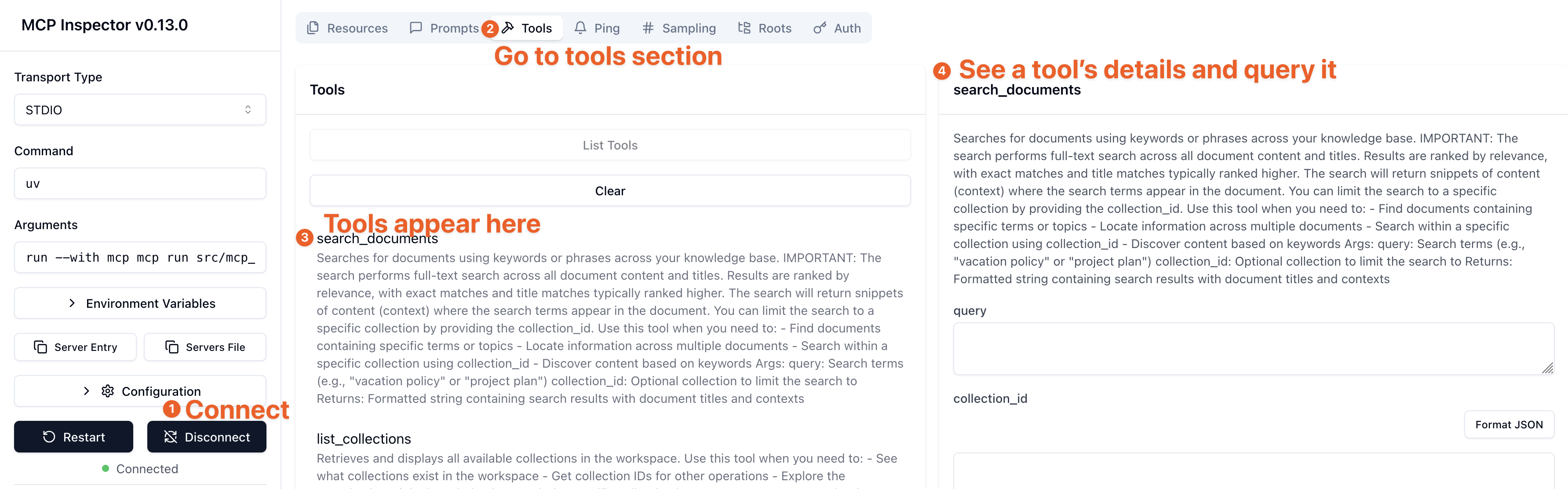
Use the MCP Inspector to test the server tools visually via an interactive UI.
For local development (with stdio):
npx @modelcontextprotocol/inspector -e OUTLINE_API_KEY=<your-key> -e OUTLINE_API_URL=<your-url> uv run python -m mcp_outline
For Docker Compose (with HTTP):
npx @modelcontextprotocol/inspector http://localhost:3000
Rate Limiting: Automatically handled via header tracking (RateLimit-Remaining, RateLimit-Reset) with exponential backoff retry (up to 3 attempts). No configuration needed.
Transport Modes:
stdio (default): Direct process communicationsse: HTTP Server-Sent Events (use for web clients)streamable-http: Streamable HTTP transportConnection Pooling: Shared httpx connection pool across instances (configurable: OUTLINE_MAX_CONNECTIONS=100, OUTLINE_MAX_KEEPALIVE=20)
Check your API credentials:
# Test your API key
curl -H "Authorization: Bearer YOUR_API_KEY" YOUR_OUTLINE_URL/api/auth.info
Common issues:
OUTLINE_API_KEY is set correctly in your MCP client configurationOUTLINE_API_URL points to your Outline instance (default: https://app.getoutline.com/api)/apiOUTLINE_READ_ONLY=true is disabling write toolsOUTLINE_DISABLE_DELETE=true is hiding delete toolsOUTLINE_DISABLE_AI_TOOLS=true is disabling AI featuresThe server automatically handles rate limiting with retry logic. If you see persistent rate limit errors:
Container won't start:
OUTLINE_API_KEY is set: docker run -e OUTLINE_API_KEY=your_key ...docker logs <container-id>Can't connect from client:
0.0.0.0 for MCP_HOST: -e MCP_HOST=0.0.0.0-p 3000:3000-e MCP_TRANSPORT=streamable-httpContributions welcome! Please submit a Pull Request.
This project is licensed under the MIT License - see the LICENSE file for details.
