
MCP自定义主机
HTTP-SSE自定义主机的MCP概念验证
自定义主机的MCP概念验证
This project is a proof of concept (POC) demonstrating how to implement a Model Context Protocol (MCP) with a custom-built host to play with agentic systems. The code is primarily written from scratch to provide a clear understanding of the underlying mechanisms.
The primary goal of this project is to enable easy testing of agentic systems through the Model Context Protocol. For example:
dispatch_agent could be specialized to scan codebases for security vulnerabilitiesThese specialized agents can be easily tested and iterated upon using the tools provided in this repository.
github.com/mark3labs/mcp-goThe tools use the default GCP login credentials configured by gcloud auth login.
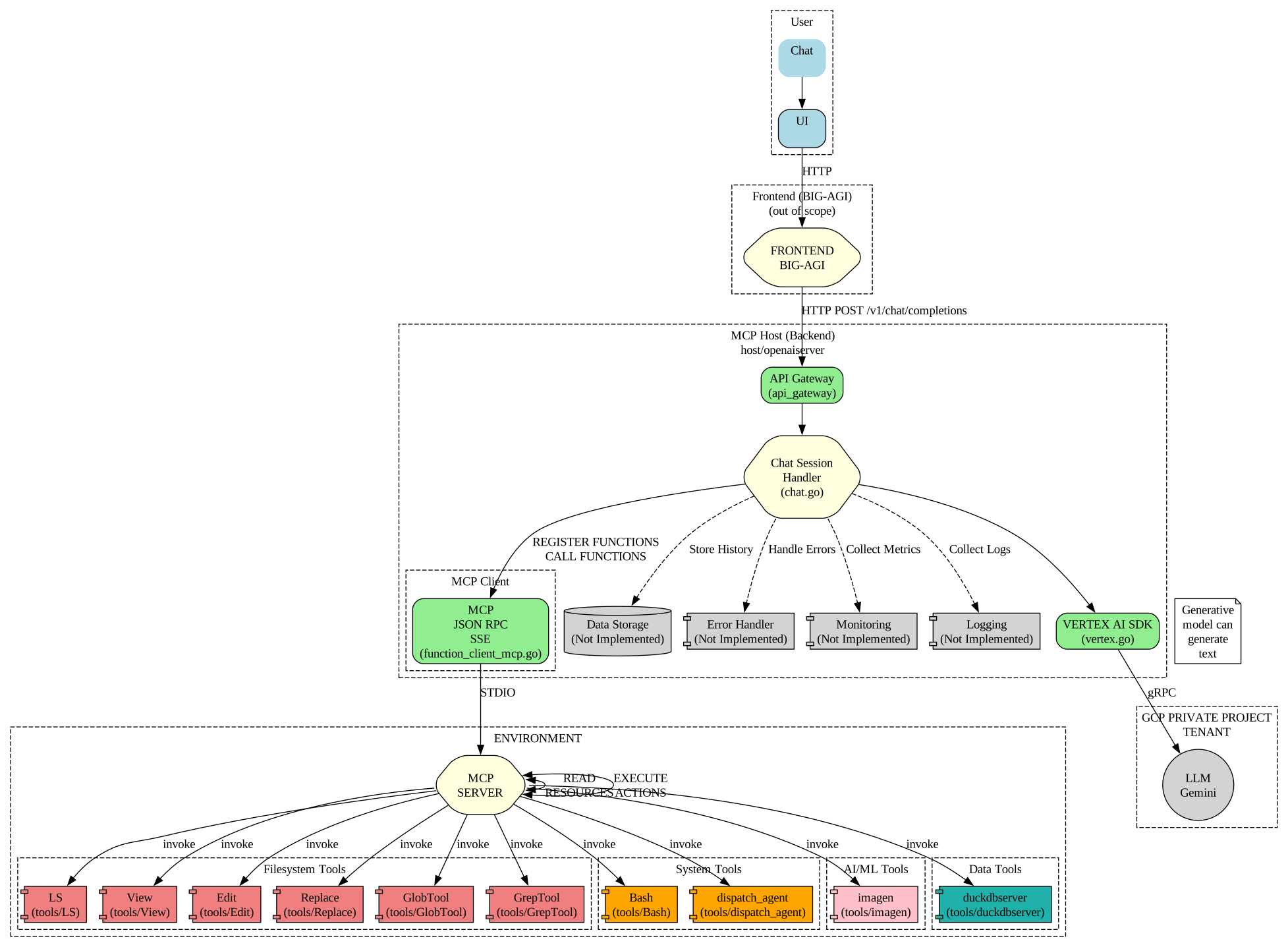
host/openaiserver: Implements a custom host that mimics the OpenAI API, using Google Gemini and function calling. This is the core of the POC and includes the modern AgentFlow web UI.host/cliGCP: CLI tool similar to Claude Code for testing agentic interactions. ⚠️ Note: This component is deprecated in favor of the AgentFlow web UI.tools: Contains various MCP-compatible tools that can be used with the host:
You can build all tools and servers using the root Makefile:
# Build all tools and servers
make all

# Build only tools
make tools

# Build only servers
make servers

# Run a specific tool for testing
make run TOOL=Bash

# Install binaries to a directory
make install INSTALL_DIR=/path/to/install

# Clean build artifacts
make clean
Set up the required environment variables for the host applications:
export GCP_PROJECT=your-project-id
export GCP_REGION=your-region
export GEMINI_MODELS=gemini-2.0-flash

# Optional: Enable Vertex AI built-in tools
export VERTEX_AI_CODE_EXECUTION=true
export VERTEX_AI_GOOGLE_SEARCH=true
export VERTEX_AI_GOOGLE_SEARCH_RETRIEVAL=true
Note: IMAGEN_MODELS and IMAGE_DIR are no longer needed for the hosts as imagen functionality is now provided by the independent MCP tool in tools/imagen.
AgentFlow is the modern web-based interface for interacting with the agentic system. It is embedded directly in the openaiserver binary and provides a professional, mobile-optimized chat experience with real-time streaming responses.
Simply start the openaiserver and access the UI at the /ui endpoint:
./bin/openaiserver
# AgentFlow UI available at: http://localhost:8080/ui
That's it! No separate UI server needed - AgentFlow is embedded in the main binary.
The simpleui directory contains a standalone UI server used only for development and testing purposes. Regular users should use the embedded UI via /ui endpoint.
⚠️ Note: The CLI tool is deprecated in favor of the AgentFlow web UI.
You can still test the legacy CLI from the bin directory with:
./cliGCP -mcpservers "./GlobTool;./GrepTool;./LS;./View;./dispatch_agent -glob-path ./GlobTool -grep-path ./GrepTool -ls-path ./LS -view-path ./View;./Bash;./Replace;./imagen"
⚠️ WARNING: These tools have the ability to execute commands and modify files on your system. They should preferably be used in a chroot or container environment to prevent potential damage to your system.
This guide will help you quickly run the openaiserver located in the host/openaiserver directory.
Navigate to the host/openaiserver directory:
cd host/openaiserver
Set the required environment variables. Refer to the Configuration section for details on the environment variables. A minimal example:
export GCP_PROJECT=your-gcp-project-id
export GCP_REGION=us-central1
Run the server:
go run .
or
go run main.go
For testing with full event streaming (recommended for development):
go run . -withAllEvents
The server will start and listen on the configured port (default: 8080).
The openaiserver application is configured using environment variables. The following variables are supported:
| Variable | Description | Default | Required |
|---|---|---|---|
PORT | The port the server listens on | 8080 | No |
LOG_LEVEL | Log level (DEBUG, INFO, WARN, ERROR) | INFO | No |
| Variable | Description | Default | Required |
|---|---|---|---|
GCP_PROJECT | Google Cloud Project ID | Yes | |
GEMINI_MODELS | Comma-separated list of Gemini models | gemini-1.5-pro,gemini-2.0-flash | No |
GCP_REGION | Google Cloud Region | us-central1 | No |
| Variable | Description | Default | Required |
|---|---|---|---|
VERTEX_AI_CODE_EXECUTION | Enable Vertex AI Code Execution tool | false | No |
VERTEX_AI_GOOGLE_SEARCH | Enable Vertex AI Google Search tool | false | No |
VERTEX_AI_GOOGLE_SEARCH_RETRIEVAL | Enable Vertex AI Google Search Retrieval tool | false | No |
| Flag | Description | Default | Required |
|---|---|---|---|
-mcpservers | Input string of MCP servers | No | |
-withAllEvents | Include all events (tool calls, tool responses) in stream output, not just content chunks | false | No |
⚠️ Important for Testing: The -withAllEvents flag is mandatory for testing tool event flows in development. It enables streaming of all tool execution events including tool calls and responses, which is essential for debugging and development. Without this flag, only standard chat completion responses are streamed.
Note: IMAGEN_MODELS and IMAGE_DIR environment variables are no longer needed for the hosts. Image generation is now handled by the independent tools/imagen MCP server.