
MCP
HTTP-SSEPowerful MCP server supporting tool chains, multiple services, and plugin systems
Powerful MCP server supporting tool chains, multiple services, and plugin systems

小智 & Cursor 的 MCP 启动器 - MCP For Cursor&xiaozhi
MCP Server.exe 是一个强大的可执行服务器,它不仅能够运行标准的 MCP (Model Context Protocol) 服务,更提供了丰富的高级功能:
--mcp-config 与 --mcp-js 变更,自动重启生效MCP Server.exe is a powerful executable server that not only runs standard MCP (Model Context Protocol) services, but also provides rich advanced features:
# 推荐:通过 CLI 运行(无需本地构建)
npx mcp_exe --mcp-config ./examples/mcp.json

# 或运行打包后的可执行文件(Windows/macOS)
./executables/mcp_server-win-x64.exe --mcp-config ./examples/mcp.json
支持通过 WebSocket 连接到其他 MCP 服务,特别适合连接到 xiaozhi.me 等的接入。通过配置文件,可以轻松地将多个 MCP 服务接入到 xiaozhi.me。
Support connecting to other MCP services via WebSocket, especially suitable for connecting to WebSocket-enabled MCP services like xiaozhi.me. Through configuration files, you can easily integrate multiple MCP services with xiaozhi.me.
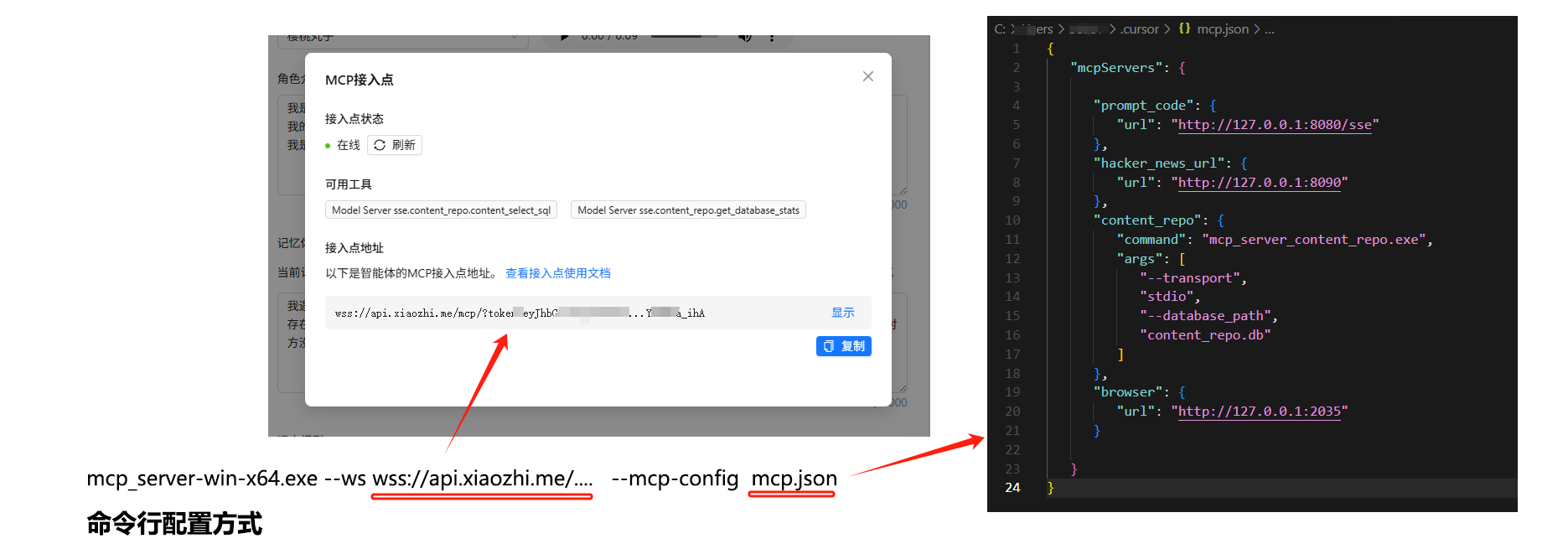
# 使用配置文件连接到 xiaozhi.me / Start in WebSocket mode
npx mcp_exe --ws wss://api.xiaozhi.me/mcp/?token=...xxx --mcp-config ./examples/mcp-sse.json
配置示例 | Configuration Example (mcp-sse.json):
{
    "mcpServers": {
        "Model Server sse": {
            "url": "http://127.0.0.1:3000"
        }
    },
    "serverInfo": {
        "serverName": "ws-client-mcp-server",
        "version": "1.0.0",
        "description": "WebSocket 客户端的 MCP 服务器实例",
        "author": "shadow"
    }
}
WebSocket 模式特性 | WebSocket Mode Features:
最简单的使用方式 - 双击运行,或使用 npx 即可启动一个标准的 MCP 服务。
The simplest way - double-click to run, or start via npx.
# 双击运行 mcp_server.exe,或通过命令行启动
./executables/mcp_server-win-x64.exe
# 或
npx mcp_exe
默认配置 | Default Configuration:
--port 修改)/ 建立会话,POST /sessions?sessionId=... 发送消息--mcp-config 与 --mcp-js使用与 Cursor 一致的 mcp.json 配置文件,通过配置文件组合多个 MCP 服务,支持同时使用 SSE 和 stdio 两种传输模式。这样可以根据不同的应用场景选择合适的传输方式,提高系统的灵活性和可扩展性。
Use the same mcp.json configuration file as Cursor to combine multiple MCP services, supporting both SSE and stdio transport modes simultaneously.
npx mcp_exe --mcp-config ./examples/mcp.json
配置示例 | Configuration Example (mcp.json):
{
  "mcpServers": {
    "Model Server sse": { "url": "http://127.0.0.1:9090" },
    "Model Server - stdio": { "command": "xxx", "args": ["--transport", "stdio"] }
  },
  "serverInfo": { "serverName": "dynamic-mcp-server" },
  "tools": [],
  "namespace": "."
}
tools: 允许的工具白名单(为空数组表示不过滤)namespace: 组合命名空间分隔符,默认 .(亦可使用 ::)支持将多个工具组合成工具链,实现复杂的自动化流程。工具链可以灵活配置数据流转和结果输出。
Support combining multiple tools into a tool chain to implement complex automation processes. Tool chains can flexibly configure data flow and result output.
npx mcp_exe --mcp-config ./examples/product-hunt/mcp-tools.json
配置示例 | Configuration Example(节选,自定义按需调整):
{
  "toolChains": [
    {
      "name": "product_hunt_news",
      "description": "get product hunt news",
      "steps": [
        { "toolName": "get_product_hunt_url", "args": {} },
        { "toolName": "load_product_hunt_js_code", "args": {} },
        { "toolName": "browser_navigate", "args": {}, "outputMapping": { "url": "content.0.text" }, "fromStep": 0 },
        { "toolName": "browser_execute_javascript", "args": {}, "outputMapping": { "code": "content.0.text" }, "fromStep": 1 },
        { "toolName": "browser_close", "args": {} }
      ],
      "output": { "steps": [3] }
    }
  ]
}
工具链特性 | Tool Chain Features:
outputMapping/fromStep)output.steps)通过 JavaScript 配置文件,灵活定义工具、资源和提示。
Flexibly define tools, resources, and prompts through JavaScript configuration files.
npx mcp_exe --mcp-js ./examples/custom-mcp-config.js
配置示例 | Configuration Example (custom-mcp-config.js):
module.exports = {
  // 推荐导出名:configureMcp(也兼容 mcpPlugin)
  configureMcp: function(server, ResourceTemplate, z) {
    server.tool('myTool', '自定义工具示例', { /* zod schema */ }, async (args) => ({ content: [{ type: 'text', text: 'ok' }] }))
    server.resource('custom-echo', new ResourceTemplate('custom-echo://{message}', { list: undefined }), async (uri, { message }) => ({ contents: [{ uri: uri.href, text: message }] }))
    server.prompt('custom-prompt', { /* zod */ }, ({ message }) => ({ messages: [{ role: 'user', content: { type: 'text', text: message } }] }))
  }
}
使用 --cronjob 定时执行工具。目前支持的操作:listTools、callTool。任务会在启动时立即执行一次,并按 schedule 周期执行,可通过桌面气泡/邮件/ntfy 推送结果。
# 示例:结合自定义工具与定时任务
npx mcp_exe --cronjob ./examples/cronjob.json --mcp-js ./examples/product-hunt/custom-mcp-config.js
配置示例 | Configuration Example(examples/cronjob.json):
{
  "tasks": [
    {
      "schedule": "*/30 * * * * *",
      "operations": [
        { "type": "callTool", "name": "get_product_hunt_url", "arguments": {} }
      ],
      "notify": [
        { "type": "desktop", "title": "任务执行结果", "icon": "" }
      ]
    }
  ]
}
通知支持 | Notifications:
to、subject 等)ntfy(需提供 url、topic、tags、priority)注意:定时任务直接调用已组合的工具(含远端 SSE/本地 stdio 工具),无需在任务中指定传输。
作为独立进程集成到任何应用程序中。
Integrate as a standalone process into any application.
// Node.js 示例 | Node.js Example
const { spawn } = require('child_process')

const mcpServer = spawn('./executables/mcp_server-win-x64.exe', [
  '--port', '3000',
  '--transport', 'stdio'
])

mcpServer.stdout.on('data', (data) => {
  // 处理 MCP 服务器的输出
})

mcpServer.stdin.write(JSON.stringify({
  // 发送请求到 MCP 服务器
}))
服务器支持以下命令行参数来自定义其行为:The server supports the following command line arguments:
| 参数 | 说明 | 默认值 |
|---|---|---|
--ws <url> | WebSocket 服务器地址,启用 WebSocket 连接模式 | 无 |
--mcp-js <路径> | MCP JavaScript 配置文件路径(支持 configureMcp 或 mcpPlugin) | 无 |
--mcp-config <路径/json字符串> | MCP JSON 配置文件路径或 JSON 字符串 | 无 |
--server-name <name> | 服务器名称 | mcp_server_exe |
| --port <端口> | 服务器监听端口 | 3000 |
| --transport <模式> | 传输模式,支持 sse 或 stdio(非 WS 模式下生效) | sse |
| --cronjob <路径/json> | 定时任务配置文件路径或 JSON 字符串 | 无 |
| --cursor-link | 启动后在 Cursor 中快捷接入(SSE 模式) | 关闭 |
| --log-level <level> | 日志级别:TRACE/DEBUG/INFO/WARN/ERROR/FATAL/OUTPUT | INFO |
| --version <version> --description <desc> --author <author> --license <license> --homepage <url> | 元信息 | - |
提示:若提供 --ws 则优先使用 WebSocket 模式;否则未显式指定时默认使用 sse。
服务器支持使用配置文件同时配置服务器参数和 MCP 功能:
module.exports = {
  // MCP 配置函数 | MCP configuration function
  configureMcp: function(server, ResourceTemplate, z) {
    // 配置资源和工具 | Configure resources and tools
  },
  // 可选:提供额外的 mcp 配置对象
  mcpConfig: { /* mcpServers/tools/toolChains/namespace */ }
}
--mcp-config 文件变更:自动重新解析并重启服务(含工具链/命名空间/工具白名单等)--mcp-js 文件变更:自动重新加载自定义 configureMcp/mcpPluginnpm install
yarn build # 或 npm run build
npm start
# 或开发模式(SSE):
npm run dev
# WebSocket 开发:
npm run dev-ws
# Cronjob 开发:
npm run dev-cronjob
# Windows 打包
npm run package-win

# macOS 打包(Intel/Apple Silicon)
npm run package-mac-intel
npm run package-mac-arm
打包后的可执行文件将生成在 executables 目录中。
--log-level 控制最小输出级别(默认 INFO)OUTPUT 级别用于原样输出供工具解析自 v0.11.x 起,提供稳定导出:McpRouterServer。
// CommonJS
const { McpRouterServer } = require('mcp_exe');

(async () => {
  const server = new McpRouterServer({ name: 'my-app' }, { transportType: 'sse', port: 3000 });
  await server.importMcpConfig(require('./mcp.json'), null);
  await server.start();
})();
// TypeScript / ESM
import { McpRouterServer } from 'mcp_exe';

const server = new McpRouterServer({ name: 'my-app' }, { transportType: 'stdio' });
await server.importMcpConfig(mcpJson, null);
await server.start();
dist/index.d.ts,通过 types/exports 自动暴露。bin/cli.js 提供,库与 CLI 可并行使用。MIT