
Interactive Brokers
STREAMABLE HTTPInteractive Brokers Web API MCP server for trading and portfolio management
Interactive Brokers Web API MCP server for trading and portfolio management


[!Note]
Project Status
This project is currently under active development. Features may be incomplete, and breaking changes may occur.
This project is built exclusively on the Interactive Brokers Web API, and this is a deliberate design choice. While the TWS API is powerful, the Web API provides a more modern and flexible foundation for the goals of this project.
Why not using the TWS API? The short answer is that the WEB API is planned to be more comprehensive. By more comprehensive I mean, it brings account management, specifically reporting, into the same place. The two other important reasons are: 1. The Web API is standalone. It does not require you to run the TWS desktop software or IB Gateway. 2. Model context protocols (MCPs) are easier to build on top of HTTPS communication rather than TCP/IP sockets.
If it is more comprehensive why not using just the WEB API? Three reasons: 1. WEB API is in beta (see Limitations) 2. TWS is faster and more reliable for trading. 3. TWS has some trading functionalities that the WEB API does not have.
While other projects act as a "bridge" to make the TWS API look like a web API, they introduce an unofficial, third-party dependency. This project avoids that risk by using the official IBKR Web API directly, ensuring better long-term stability and support.
In summary:
For a more detailed, side-by-side breakdown, please see the TWS vs. Web API Comparison section.
This project provides an Interactive Brokers (IB) API interface using the Model Context Protocol (MCP). There are several ways to interact with Interactive Brokers, like the TWS API, the WEB API, Excel RTD and FIX among others. This project is built on top of Interactive Brokers WEB API.
This development uses the retail authentication process which is managed using the Client Portal Gateway, a small Java program used to route local web requests with appropriate authentication.
See a quick walkthrough in YOUTUBE
Clone the repo, set env variables and build the images
# Clone the repository
git clone https://github.com/rcontesti/IB_MCP.git

# Navigate to the project directory
cd IB_MCP

# Copy the .env.example file to .env and edit as needed
cp .env.example .env

# Build the image
docker compose up --build -d
Auth with your IB account and credentials to:
After the image is up and running, navigate to https://{GATEWAY_BASE_URL}:{GATEWAY_PORT} (e.g.: https://localhost:5055/) to login.
You will also find the login path in the logs of the API gateway container:
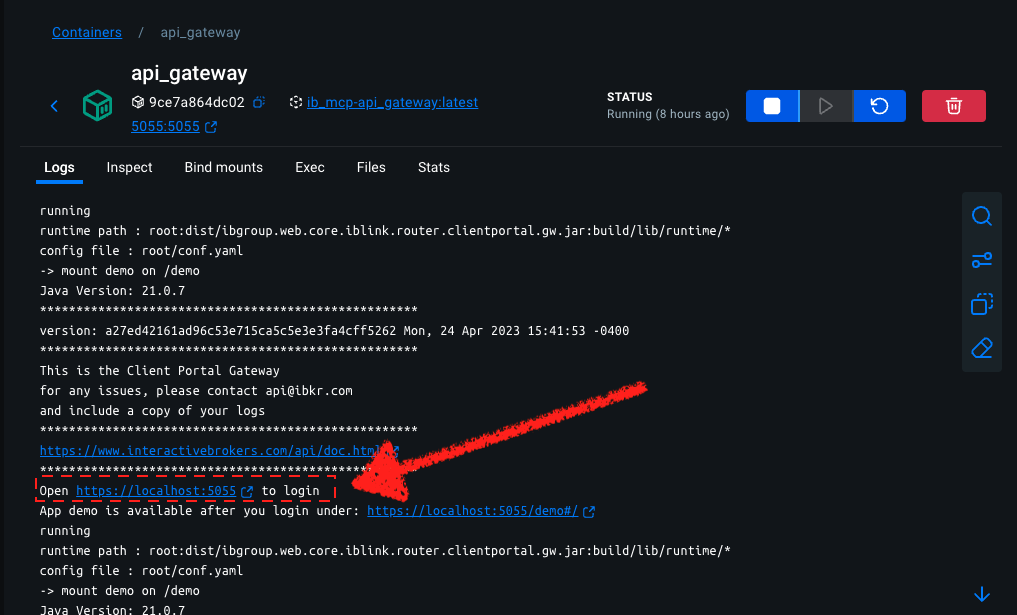 If successful you should be redirected to a URL that reads: "Client login succeeds".
Add the MCP server config file to your VS Code settings.json.
Given the following environment parameters
MCP_SERVER_HOST=0.0.0.0
MCP_SERVER_PORT=5002
MCP_SERVER_PATH=/mcp
MCP_TRANSPORT_PROTOCOL=streamable-http
the VS Code MCP server snippet in settings.json would look like:
{
  ...
    },
    "chat.mcp.discovery.enabled": true,
    "mcp": {
        "inputs": [],
        "servers": {
            "time": {
            "command": "docker",
            "args": ["run", "-i", "--rm", "mcp/time"]
            },
            "ib-web": {
                "type": "http",
                "url": "http://localhost:5002/mcp/",
            }
        }
    },
    "workbench.colorTheme": "Tomorrow Night Blue"
}
Alternatively, you can create a .vscode/mcp.json file at the root of your project with the following content:
{
    "servers": {
        "ib-mcp-server": {
            "type": "http",
            "url": "http://localhost:5002/mcp/"
        }
    },
    "inputs": []
}
Check Use MCP servers in VS Code (Preview) for further reference.
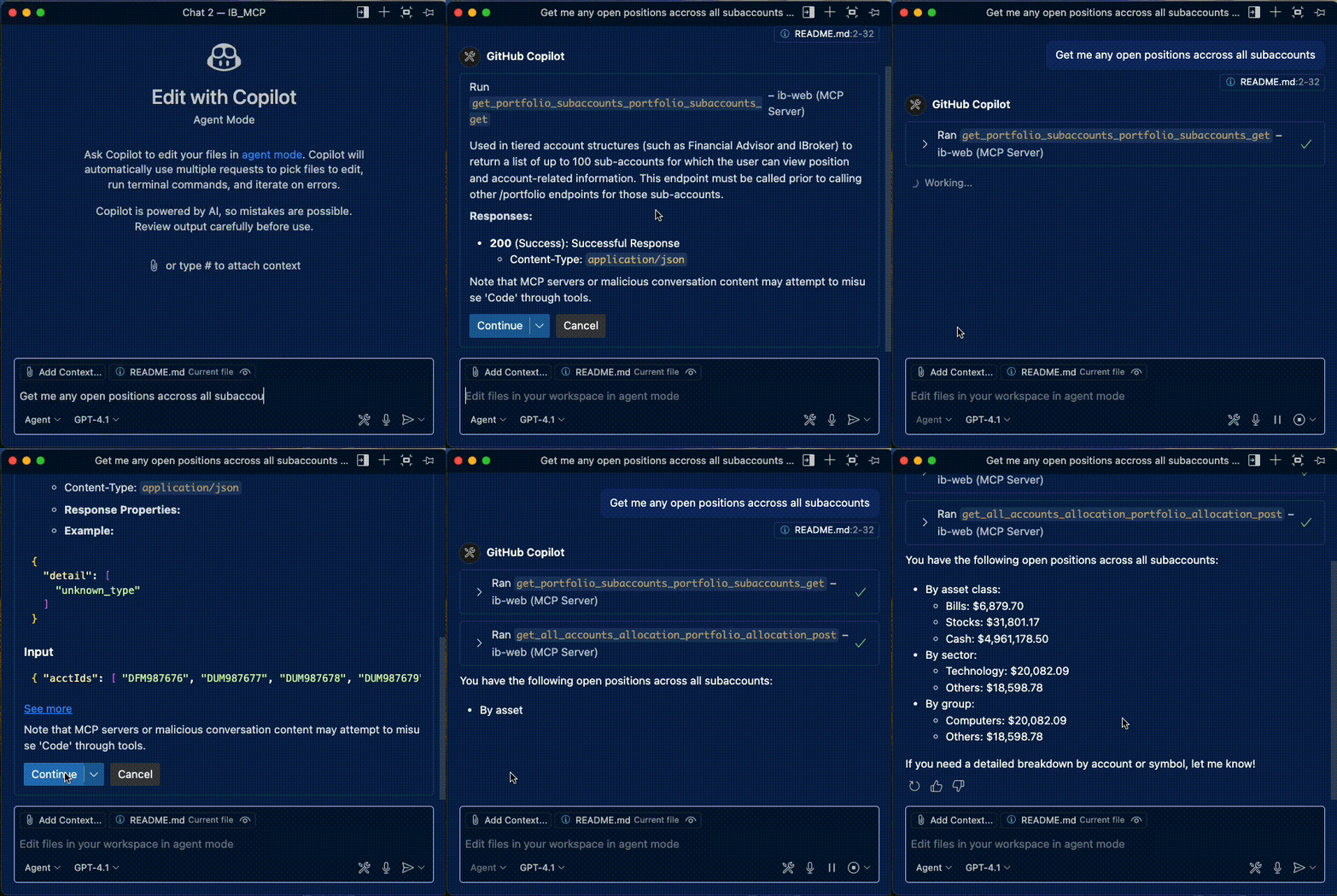
Start the MCP in Copilot
The additional /iserver/auth/ssodh/init endpoint is used to subsequently reopen a brokerage session with the backend, through which you can access the protected /iserver endpoints.
Sessions will time out after approximately 6 minutes without sending new requests or maintaining the /tickle endpoint at least every 5 minutes.
In order to prevent the session from timing out, the endpoint /tickle should be called on a regular basis. It is recommended to call this endpoint approximately every minute.
If the brokerage session has timed out but the session is still connected to the IBKR backend, the response to /auth/status returns ‘connected’:true and ‘authenticated’:false. Calling the /iserver/auth/ssodh/init endpoint will initialize a new brokerage session.
Automatically generate endpoints
Currently the IB REST API (2.16.0) OpenAPI specification fails validation, and the automated router generation feature is currently failing to generate routers. You can try to validate yourself here:
The spec currently has 351 errors. Therefore, router endpoints are currently being built manually, and their status is updated upon completion.
Add OAuth
Endpoints are currently manually built.
👉 See the full list of API Endpoints Staus
| Feature | TWS API | Web API (Client Portal API) |
|---|---|---|
| Technology | TCP/IP Socket, Proprietary binary protocol | RESTful, HTTPS, JSON format |
| Dependency | Requires TWS or IB Gateway to be running | Standalone (does not require TWS/Gateway) |
| Ease of Use | Steep learning curve, complex | Much easier, standard for web developers |
| Performance | Very high speed, low latency. Ideal for high-frequency data and fast order execution. | Slower due to HTTPS overhead. Not for HFT. |
| Functionality | Extremely comprehensive. Access to virtually every feature in TWS, including complex order types, combos, algos, etc. | More limited. Covers core trading, portfolio, and market data, but lacks the most advanced features. |
| Data Streaming | Robust, high-frequency streaming for market data, account updates, etc. | Supports streaming via a WebSocket connection (/ws). |
| Historical Data | Very deep and extensive access to historical data. | Good access, but can be more limited in scope and request frequency. |
| Authentication | Connects directly to an authenticated TWS/Gateway session. | Modern OAuth-based authentication. More secure for web apps but requires a more complex initial setup. |
| Ideal Use Cases | Algorithmic trading, custom trading desktops, high-frequency strategies, complex options analysis. | Web dashboards, mobile apps, portfolio analysis tools, simple trading bots, reporting. |
| Community/Libraries | Very mature. Many third-party libraries in Python, Java, C#, C++, etc. | Newer, but growing. Easy to use with any language that can make HTTP requests. |
Choose the TWS API if:
Choose the Web API (Client Portal API) if:
The project consists of 2 main Docker services:
/tickle endpoint to prevent timeouts.mcp_server/routers/.This Docker container sets up and runs the Interactive Brokers (IB) Client Portal Gateway, which is required for applications to connect via the IB REST API.
eclipse-temurin:21 (Java 21) for compatibility with the IB Gateway.unzip for extracting the gateway archive, and curl for the tickler service.conf.yaml into the expected path (gateway/root/conf.yaml) to configure the gateway.run_gateway.sh script that starts the gateway and launches the integrated tickler service./tickle endpoint every 60 seconds to maintain the session.5055 (default port used by the gateway). Override as needed in .env.This setup provides a self-contained, reproducible environment for securely running the Interactive Brokers REST API gateway with automatic session management in a containerized environment.
This Docker container sets up and runs the Interactive Brokers (IB) Model Context Protocol (MCP) Server, which provides an interface for interacting with the IB API gateway.
ghcr.io/astral-sh/uv:python3.11-bookworm-slim for a lightweight Python 3.11 environment with uv.curl for system dependencies and uses uv sync to install Python dependencies from pyproject.toml.pyproject.toml and the entire mcp_server directory (including mcp_server/routers/) into the container.PYTHONPATH to /app and UV_CACHE_DIR to /tmp/uv-cache.mcp_server/routers/ (not auto-generated due to OpenAPI spec validation issues).MCP_SERVER_PORT environment variable (e.g., 5002).uv run -- python /app/mcp_server/fastapi_server.py.This setup provides a containerized environment for the MCP server with integrated routers, enabling it to communicate with the IB Client Portal Gateway via the Model Context Protocol.
IB WEB API openapi docs Outdated!
We welcome contributions to this project! If you'd like to contribute, please follow these guidelines:
main.This project is licensed under the MIT License - see the LICENSE file for details.