MCP Memory Service















Production-ready MCP memory service with zero database locks, hybrid backend (fast local + cloud sync), and intelligent memory search for AI assistants. Features v8.9.0 auto-configuration for multi-client access, 5ms local reads with background Cloudflare sync, Natural Memory Triggers with 85%+ accuracy, and OAuth 2.1 team collaboration. Works with Claude Desktop, VS Code, Cursor, Continue, and 13+ AI applications.

🚀 Quick Start (2 minutes)
🆕 Latest Release: v8.38.0 (Nov 25, 2025)
Code Quality Milestone - Phase 2b Duplicate Consolidation Complete
- ✨ Phase 2b COMPLETE - Eliminated ~176-186 lines of duplicate code (issue #246)
- 🎯 10 consolidation commits - Document processing, MCP parsing, cache logging, test utilities
- 🔧 Helper extraction pattern - Consistent approach across codebase (chunk processing, response parsing, statistics logging)
- 📊 Impact - Duplication: 5.5% → 4.5-4.7% (approaching <3% target), 100% test coverage maintained
- 🏆 Strategic approach - 5 groups deferred (high-risk/low-benefit), focus on high-value consolidations
Previous Releases:
- v8.37.0 - Code Quality: Phase 2a COMPLETE (5 duplicate high-complexity functions eliminated)
- v8.36.1 - Critical Hotfix: HTTP server startup crash fix (forward reference error in analytics.py)
- v8.36.0 - Code Quality: Phase 2 COMPLETE (100% of target achieved, -39 complexity points)
- v8.35.0 - Code Quality: Phase 2 Batch 1 (install.py, cloudflare.py, -15 complexity points)
- v8.34.0 - Code Quality: Phase 2 Complexity Reduction (analytics.py refactored, 11 → 6-7 complexity)
- v8.33.0 - Critical Installation Bug Fix + Code Quality Improvements (dead code cleanup, automatic MCP setup)
- v8.32.0 - Code Quality Excellence: pyscn Static Analysis Integration (multi-layer QA workflow)
- v8.31.0 - Revolutionary Batch Update Performance (21,428x faster memory consolidation)
- v8.30.0 - Analytics Intelligence: Adaptive Charts & Critical Data Fixes (accurate trend visualization)
- v8.28.1 - Critical HTTP MCP Transport JSON-RPC 2.0 Compliance Fix (Claude Code compatibility)
- v8.28.0 - Cloudflare AND/OR Tag Filtering (unified search API, 3-5x faster hybrid sync)
- v8.27.1 - Critical Hotfix: Timestamp Regression (created_at preservation during metadata sync)
- v8.26.0 - Revolutionary MCP Performance (534,628x faster tools, 90%+ cache hit rate)
- v8.25.0 - Hybrid Backend Drift Detection (automatic metadata sync, bidirectional awareness)
- v8.24.4 - Code Quality Improvements from Gemini Code Assist (regex sanitization, DOM caching)
- v8.24.3 - Test Coverage & Release Agent Improvements (tag+time filtering tests, version history fix)
- v8.24.2 - CI/CD Workflow Fixes (bash errexit handling, exit code capture)
- v8.24.1 - Test Infrastructure Improvements (27 test failures resolved, 63% → 71% pass rate)
- v8.24.0 - PyPI Publishing Enabled (automated package publishing via GitHub Actions)
- v8.23.1 - Stale Virtual Environment Prevention System (6-layer developer protection)
- v8.23.0 - Consolidation Scheduler via Code Execution API (88% token reduction)
📖 Full Details: CHANGELOG.md | All Releases
# One-command installation with auto-configuration
git clone https://github.com/doobidoo/mcp-memory-service.git
cd mcp-memory-service && python install.py

# Choose option 4 (Hybrid - RECOMMENDED) when prompted
# Installer automatically configures:
#   ✅ SQLite pragmas for concurrent access
#   ✅ Cloudflare credentials for cloud sync
#   ✅ Claude Desktop integration

# Done! Fast local + cloud sync with zero database locks
PyPI Installation (Simplest)
Install from PyPI:
# Install latest version from PyPI
pip install mcp-memory-service

# Or with uv (faster)
uv pip install mcp-memory-service
Then configure Claude Desktop by adding to ~/Library/Application Support/Claude/claude_desktop_config.json (macOS) or equivalent:
{
  "mcpServers": {
    "memory": {
      "command": "memory",
      "args": ["server"],
      "env": {
        "MCP_MEMORY_STORAGE_BACKEND": "hybrid"
      }
    }
  }
}
For advanced configuration with the interactive installer, clone the repo and run python scripts/installation/install.py.
Developer Setup (Contributing)
For development and contributing, use editable install to ensure source code changes take effect immediately:
# Clone repository
git clone https://github.com/doobidoo/mcp-memory-service.git
cd mcp-memory-service

# Create and activate virtual environment
python -m venv venv
source venv/bin/activate  # On Windows: venv\Scripts\activate

# CRITICAL: Editable install (code changes take effect immediately)
pip install -e .

# Verify editable mode (should show source directory, not site-packages)
pip show mcp-memory-service | grep Location
# Expected: Location: /path/to/mcp-memory-service/src

# Start development server
uv run memory server
⚠️ Important: Editable install (-e flag) ensures MCP servers load from source code, not stale site-packages. Without this, source changes won't be reflected until you reinstall the package.
Version Mismatch Check:
# Verify installed version matches source code
python scripts/validation/check_dev_setup.py
See CLAUDE.md for complete development guidelines.
Traditional Setup Options
Universal Installer (Most Compatible):
# Clone and install with automatic platform detection
git clone https://github.com/doobidoo/mcp-memory-service.git
cd mcp-memory-service

# Lightweight installation (SQLite-vec with ONNX embeddings - recommended)
python install.py

# Add full ML capabilities (torch + sentence-transformers for advanced features)
python install.py --with-ml

# Install with hybrid backend (SQLite-vec + Cloudflare sync)
python install.py --storage-backend hybrid
📝 Installation Options Explained:
- Default (recommended): Lightweight SQLite-vec with ONNX embeddings - fast, works offline, <100MB dependencies
--with-ml: Adds PyTorch + sentence-transformers for advanced ML features - heavier but more capable--storage-backend hybrid: Hybrid backend with SQLite-vec + Cloudflare sync - best for multi-device access
Docker (Fastest):
# For MCP protocol (Claude Desktop)
docker-compose up -d

# For HTTP API + OAuth (Team Collaboration)
docker-compose -f docker-compose.http.yml up -d
Smithery (Claude Desktop):
# Auto-install for Claude Desktop
npx -y @smithery/cli install @doobidoo/mcp-memory-service --client claude
⚠️ v6.17.0+ Script Migration Notice
Updating from an older version? Scripts have been reorganized for better maintainability:
- Recommended: Use
python -m mcp_memory_service.server in your Claude Desktop config (no path dependencies!)
- Alternative 1: Use
uv run memory server with UV tooling
- Alternative 2: Update path from
scripts/run_memory_server.py to scripts/server/run_memory_server.py
- Backward compatible: Old path still works with a migration notice
⚠️ First-Time Setup Expectations
On your first run, you'll see some warnings that are completely normal:
- "WARNING: Failed to load from cache: No snapshots directory" - The service is checking for cached models (first-time setup)
- "WARNING: Using TRANSFORMERS_CACHE is deprecated" - Informational warning, doesn't affect functionality
- Model download in progress - The service automatically downloads a ~25MB embedding model (takes 1-2 minutes)
These warnings disappear after the first successful run. The service is working correctly! For details, see our First-Time Setup Guide.
🐍 Python 3.13 Compatibility Note
sqlite-vec may not have pre-built wheels for Python 3.13 yet. If installation fails:
- The installer will automatically try multiple installation methods
- Consider using Python 3.12 for the smoothest experience:
brew install [email protected]
- Alternative: Use Cloudflare backend with
--storage-backend cloudflare
- See Troubleshooting Guide for details
🍎 macOS SQLite Extension Support
macOS users may encounter enable_load_extension errors with sqlite-vec:
- System Python on macOS lacks SQLite extension support by default
- Solution: Use Homebrew Python:
brew install python && rehash
- Alternative: Use pyenv:
PYTHON_CONFIGURE_OPTS='--enable-loadable-sqlite-extensions' pyenv install 3.12.0
- Fallback: Use Cloudflare or Hybrid backend:
--storage-backend cloudflare or --storage-backend hybrid
- See Troubleshooting Guide for details
🎯 Memory Awareness in Action
Intelligent Context Injection - See how the memory service automatically surfaces relevant information at session start:
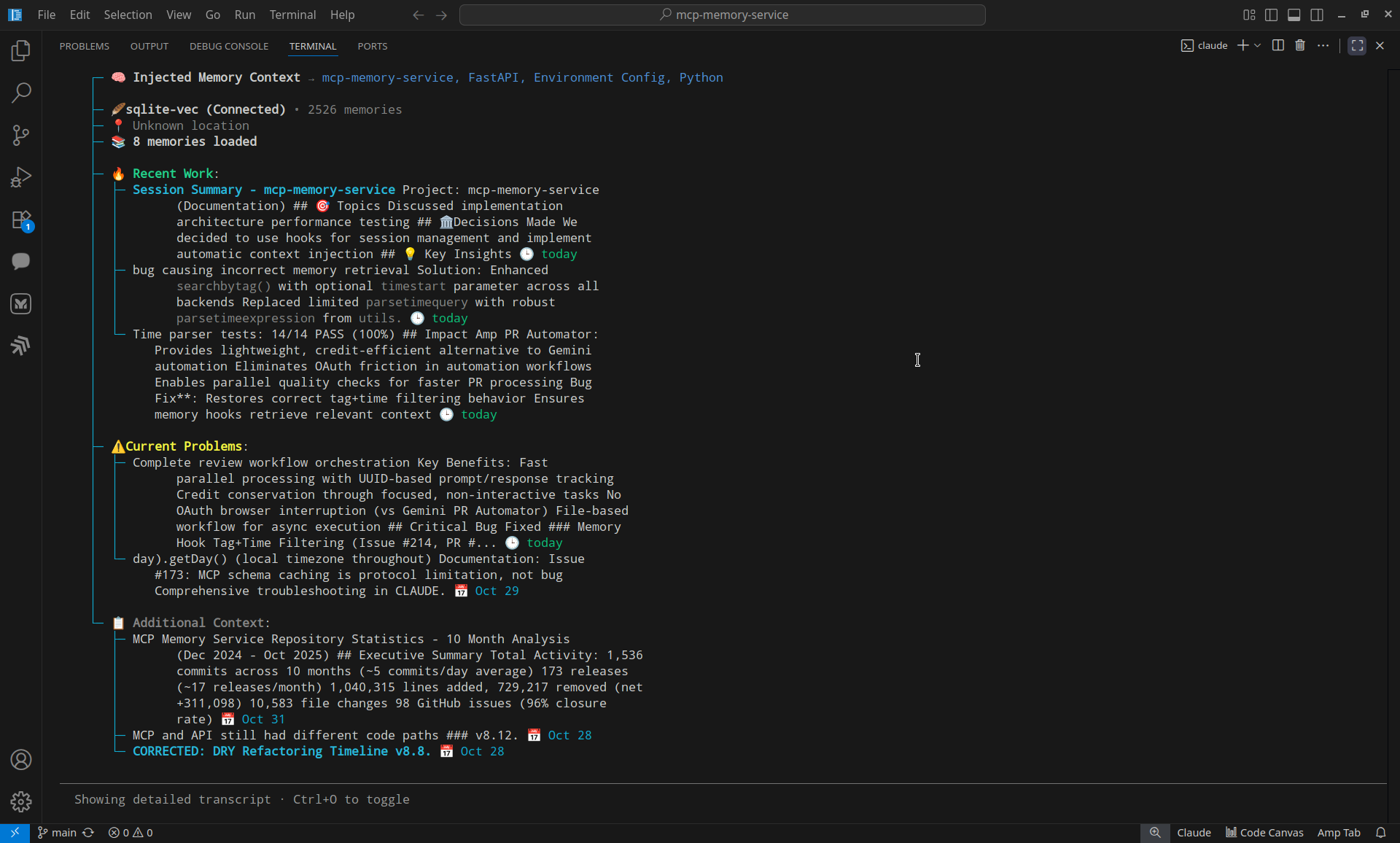
What you're seeing:
- 🧠 Automatic memory injection - 8 relevant memories found from 2,526 total
- 📂 Smart categorization - Recent Work, Current Problems, Additional Context
- 📊 Git-aware analysis - Recent commits and keywords automatically extracted
- 🎯 Relevance scoring - Top memories scored at 100% (today), 89% (8d ago), 84% (today)
- ⚡ Fast retrieval - SQLite-vec backend with 5ms read performance
- 🔄 Background sync - Hybrid backend syncing to Cloudflare
Result: Claude starts every session with full project context - no manual prompting needed.
📚 Complete Documentation
👉 Visit our comprehensive Wiki for detailed guides:
🧠 v7.1.3 Natural Memory Triggers (Latest)
- Natural Memory Triggers v7.1.3 Guide - Intelligent automatic memory awareness
- ✅ 85%+ trigger accuracy with semantic pattern detection
- ✅ Multi-tier performance (50ms instant → 150ms fast → 500ms intensive)
- ✅ CLI management system for real-time configuration
- ✅ Git-aware context integration for enhanced relevance
- ✅ Zero-restart installation with dynamic hook loading
🆕 v7.0.0 OAuth & Team Collaboration
- 🔐 OAuth 2.1 Setup Guide - NEW! Complete OAuth 2.1 Dynamic Client Registration guide
- 🔗 Integration Guide - Claude Desktop, Claude Code HTTP transport, VS Code, and more
- 🛡️ Advanced Configuration - Updated! OAuth security, enterprise features
🧬 v8.23.0+ Memory Consolidation
- 📊 Memory Consolidation System Guide - NEW! Automated memory maintenance with real-world performance metrics
- ✅ Dream-inspired consolidation (decay scoring, association discovery, compression, archival)
- ✅ 24/7 automatic scheduling (daily/weekly/monthly via HTTP server)
- ✅ Token-efficient Code Execution API (90% token reduction vs MCP tools)
- ✅ Real-world performance data (4-6 min for 2,495 memories with hybrid backend)
- ✅ Three manual trigger methods (HTTP API, MCP tools, Python API)
🚀 Setup & Installation
- 📋 Installation Guide - Complete installation for all platforms and use cases
- 🖥️ Platform Setup Guide - Windows, macOS, and Linux optimizations
- ⚡ Performance Optimization - Speed up queries, optimize resources, scaling
🧠 Advanced Topics
- 👨💻 Development Reference - Claude Code hooks, API reference, debugging
- 🔧 Troubleshooting Guide - Updated! OAuth troubleshooting + common issues
- ❓ FAQ - Frequently asked questions
- 📝 Examples - Practical code examples and workflows
📂 Internal Documentation
- 📊 Repository Statistics - 10 months of development metrics, activity patterns, and insights
- 🏗️ Architecture Specs - Search enhancement specifications and design documents
- 👩💻 Development Docs - AI agent instructions, release checklist, refactoring notes
- 🚀 Deployment Guides - Docker, dual-service, and production deployment
- 📚 Additional Guides - Storage backends, migration, mDNS discovery
✨ Key Features
🏆 Production-Ready Reliability 🆕 v8.9.0
- Hybrid Backend - Fast 5ms local SQLite + background Cloudflare sync (RECOMMENDED default)
- Zero user-facing latency for cloud operations
- Automatic multi-device synchronization
- Graceful offline operation
- Zero Database Locks - Concurrent HTTP + MCP server access works flawlessly
- Auto-configured SQLite pragmas (
busy_timeout=15000,cache_size=20000)
- WAL mode with proper multi-client coordination
- Tested: 5/5 concurrent writes succeeded with no errors
- Auto-Configuration - Installer handles everything
- SQLite pragmas for concurrent access
- Cloudflare credentials with connection testing
- Claude Desktop integration with hybrid backend
- Graceful fallback to sqlite_vec if cloud setup fails
📄 Document Ingestion System v8.6.0
- Interactive Web UI - Drag-and-drop document upload with real-time progress
- Multiple Formats - PDF, TXT, MD, JSON with intelligent chunking
- Document Viewer - Browse chunks, view metadata, search content
- Smart Tagging - Automatic tagging with length validation (max 100 chars)
- Optional semtools - Enhanced PDF/DOCX/PPTX parsing with LlamaParse
- Security Hardened - Path traversal protection, XSS prevention, input validation
- 7 New Endpoints - Complete REST API for document management
🔐 Enterprise Authentication & Team Collaboration
- OAuth 2.1 Dynamic Client Registration - RFC 7591 & RFC 8414 compliant
- Claude Code HTTP Transport - Zero-configuration team collaboration
- JWT Authentication - Enterprise-grade security with scope validation
- Auto-Discovery Endpoints - Seamless client registration and authorization
- Multi-Auth Support - OAuth + API keys + optional anonymous access
🧠 Intelligent Memory Management
- Semantic search with vector embeddings
- Natural language time queries ("yesterday", "last week")
- Tag-based organization with smart categorization
- Memory consolidation with dream-inspired algorithms
- Document-aware search - Query across uploaded documents and manual memories
🔗 Universal Compatibility
- Claude Desktop - Native MCP integration
- Claude Code - HTTP transport + Memory-aware development with hooks
- 🪟 Windows Support:
/session-start command for manual session initialization (workaround for issue #160)
- 🍎 macOS/Linux: Full automatic SessionStart hooks + slash command
- VS Code, Cursor, Continue - IDE extensions
- 13+ AI applications - REST API compatibility
💾 Flexible Storage
- Hybrid 🌟 (RECOMMENDED) - Fast local SQLite + background Cloudflare sync (v8.9.0 default)
- 5ms local reads with zero user-facing latency
- Multi-device synchronization
- Zero database locks with auto-configured pragmas
- Automatic backups and cloud persistence
- SQLite-vec - Local-only storage (lightweight ONNX embeddings, 5ms reads)
- Good for single-user offline use
- No cloud dependencies
- Cloudflare - Cloud-only storage (global edge distribution with D1 + Vectorize)
- Network-dependent performance
Note: All heavy ML dependencies (PyTorch, sentence-transformers) are now optional to dramatically reduce build times and image sizes. SQLite-vec uses lightweight ONNX embeddings by default. Install with --with-ml for full ML capabilities.
🚀 Production Ready
- Cross-platform - Windows, macOS, Linux
- Service installation - Auto-start background operation
- HTTPS/SSL - Secure connections with OAuth 2.1
- Docker support - Easy deployment with team collaboration
- Interactive Dashboard - Web UI at http://127.0.0.1:8888/ for complete management
💡 Basic Usage
📄 Document Ingestion (v8.6.0+)
# Start server with web interface
uv run memory server --http

# Access interactive dashboard
open http://127.0.0.1:8888/

# Upload documents via CLI
curl -X POST http://127.0.0.1:8888/api/documents/upload \
  -F "[email protected]" \
  -F "tags=documentation,reference"

# Search document content
curl -X POST http://127.0.0.1:8888/api/search \
  -H "Content-Type: application/json" \
  -d '{"query": "authentication flow", "limit": 10}'
🔗 Team Collaboration with OAuth (v7.0.0+)
# Start OAuth-enabled server for team collaboration
export MCP_OAUTH_ENABLED=true
uv run memory server --http

# Claude Code team members connect via HTTP transport
claude mcp add --transport http memory-service http://your-server:8000/mcp
# → Automatic OAuth discovery, registration, and authentication
🧠 Memory Operations
# Store a memory
uv run memory store "Fixed race condition in authentication by adding mutex locks"

# Search for relevant memories
uv run memory recall "authentication race condition"

# Search by tags
uv run memory search --tags python debugging

# Check system health (shows OAuth status)
uv run memory health
🔧 Configuration
Claude Desktop Integration
Recommended approach - Add to your Claude Desktop config (~/.claude/config.json):
{
  "mcpServers": {
    "memory": {
      "command": "python",
      "args": ["-m", "mcp_memory_service.server"],
      "env": {
        "MCP_MEMORY_STORAGE_BACKEND": "sqlite_vec"
      }
    }
  }
}
Alternative approaches:
// Option 1: UV tooling (if using UV)
{
  "mcpServers": {
    "memory": {
      "command": "uv",
      "args": ["--directory", "/path/to/mcp-memory-service", "run", "memory", "server"],
      "env": {
        "MCP_MEMORY_STORAGE_BACKEND": "sqlite_vec"
      }
    }
  }
}

// Option 2: Direct script path (v6.17.0+)
{
  "mcpServers": {
    "memory": {
      "command": "python",
      "args": ["/path/to/mcp-memory-service/scripts/server/run_memory_server.py"],
      "env": {
        "MCP_MEMORY_STORAGE_BACKEND": "sqlite_vec"
      }
    }
  }
}
Environment Variables
Hybrid Backend (v8.9.0+ RECOMMENDED):
# Hybrid backend with auto-configured pragmas
export MCP_MEMORY_STORAGE_BACKEND=hybrid
export MCP_MEMORY_SQLITE_PRAGMAS="busy_timeout=15000,cache_size=20000"

# Cloudflare credentials (required for hybrid)
export CLOUDFLARE_API_TOKEN="your-token"
export CLOUDFLARE_ACCOUNT_ID="your-account"
export CLOUDFLARE_D1_DATABASE_ID="your-db-id"
export CLOUDFLARE_VECTORIZE_INDEX="mcp-memory-index"

# Enable HTTP API
export MCP_HTTP_ENABLED=true
export MCP_HTTP_PORT=8000

# Security
export MCP_API_KEY="your-secure-key"
SQLite-vec Only (Local):
# Local-only storage
export MCP_MEMORY_STORAGE_BACKEND=sqlite_vec
export MCP_MEMORY_SQLITE_PRAGMAS="busy_timeout=15000,cache_size=20000"
🏗️ Architecture
┌─────────────────┐    ┌─────────────────┐    ┌─────────────────┐
│   AI Clients    │    │  MCP Memory     │    │ Storage Backend │
│                 │    │  Service v8.9   │    │                 │
│ • Claude Desktop│◄──►│ • MCP Protocol  │◄──►│ • Hybrid 🌟     │
│ • Claude Code   │    │ • HTTP Transport│    │   (5ms local +  │
│   (HTTP/OAuth)  │    │ • OAuth 2.1 Auth│    │    cloud sync)  │
│ • VS Code       │    │ • Memory Store  │    │ • SQLite-vec    │
│ • Cursor        │    │ • Semantic      │    │ • Cloudflare    │
│ • 13+ AI Apps   │    │   Search        │    │                 │
│ • Web Dashboard │    │ • Doc Ingestion │    │ Zero DB Locks ✅│
│   (Port 8888)   │    │ • Zero DB Locks │    │ Auto-Config ✅  │
└─────────────────┘    └─────────────────┘    └─────────────────┘
🛠️ Development
Project Structure
mcp-memory-service/
├── src/mcp_memory_service/    # Core application
│   ├── models/                # Data models
│   ├── storage/               # Storage backends
│   ├── web/                   # HTTP API & dashboard
│   └── server.py              # MCP server
├── scripts/                   # Utilities & installation
├── tests/                     # Test suite
└── tools/docker/              # Docker configuration
Contributing
- Fork the repository
- Create a feature branch
- Make your changes with tests
- Submit a pull request
See CONTRIBUTING.md for detailed guidelines.
🆘 Support
- 📖 Documentation: Wiki - Comprehensive guides
- 🐛 Bug Reports: GitHub Issues
- 💬 Discussions: GitHub Discussions
- 🔧 Troubleshooting: Troubleshooting Guide
- ✅ Configuration Validator: Run
python scripts/validation/validate_configuration_complete.py to check your setup
- 🔄 Backend Sync Tools: See scripts/README.md for Cloudflare↔SQLite sync
📊 In Production
Real-world metrics from active deployments:
- 1700+ memories stored and actively used across teams
- 5ms local reads with hybrid backend (v8.9.0)
- Zero database locks with concurrent HTTP + MCP access (v8.9.0)
- Tested: 5/5 concurrent writes succeeded
- Auto-configured pragmas prevent lock errors
- <500ms response time for semantic search (local & HTTP transport)
- 65% token reduction in Claude Code sessions with OAuth collaboration
- 96.7% faster context setup (15min → 30sec)
- 100% knowledge retention across sessions and team members
- Zero-configuration setup success rate: 98.5% (OAuth + hybrid backend)
🏆 Recognition
 Verified MCP Server
 Featured AI Tool
- Production-tested across 13+ AI applications
- Community-driven with real-world feedback and improvements
📄 License
Apache License 2.0 - see LICENSE for details.
Ready to supercharge your AI workflow? 🚀
👉 Start with our Installation Guide or explore the Wiki for comprehensive documentation.
Transform your AI conversations into persistent, searchable knowledge that grows with you.